
ASUS has quietly done something smart with its latest India launch. Three Chromebooks, one for every kind of buyer, all arriving at a moment when ChromeOS is finding real traction with students, young professionals, and families who just want a machine that works without drama.
The star of the show is the ASUS Chromebook CM32 Detachable, a 2-in-1 that weighs barely more than a hardcover novel. Flanking it are the Chromebook CM14 and Chromebook CM15 straightforward laptops built around genuine endurance and no-fuss usability.
Prices start at Rs 26,990. Available from June 19, 2026.
Table of contents
ASUS Chromebook CM32 Detachable: Price and Availability
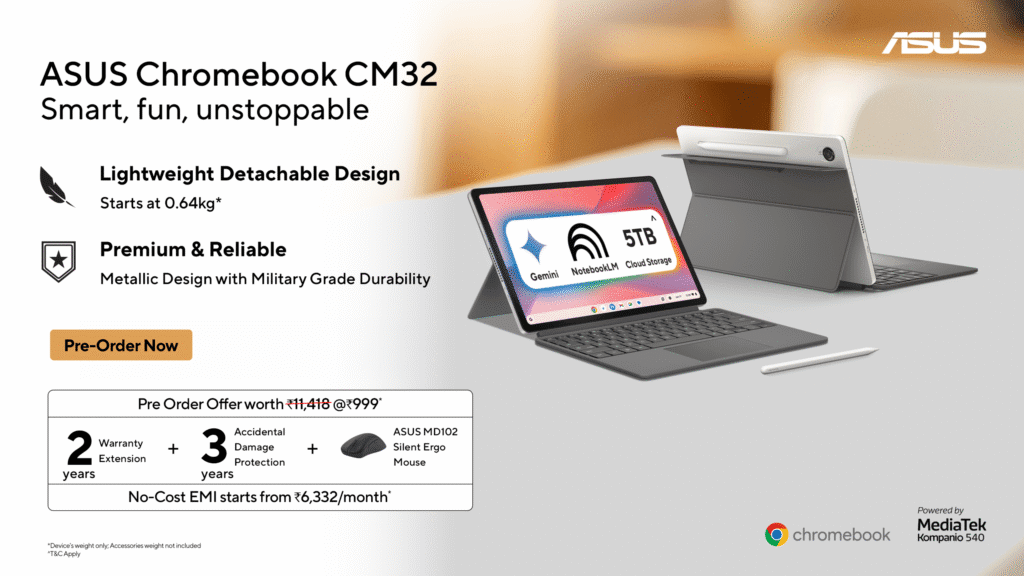
The CM32 is up for pre-order right now, from June 12, 2026. It carries a price of Rs 37,990 and goes on sale June 19 onwards.
Pre-order buyers get a bundled offer worth Rs 11,418 for just Rs 999 extra: a 2-year warranty extension, 3-year accidental damage protection, and an ASUS MD102 Silent Ergo Mouse. No-cost EMI starts at Rs 6,332 per month.
Check ASUS Chromebook CM32 on Amazon (link goes live at launch)
ASUS Chromebook CM14 and CM15: Price and Availability
Both the CM14 and CM15 launch on June 19, 2026.
| Model | Price | Display | Availability |
|---|---|---|---|
| ASUS Chromebook CM14 (CM1405) | Rs 26,990 | 14-inch FHD | June 19, 2026 |
| ASUS Chromebook CM15 (CM1505) | Rs 28,990 | 15.6-inch FHD | June 19, 2026 |
Check ASUS Chromebook CM14 on Amazon (link goes live at launch)
Check ASUS Chromebook CM15 on Amazon (link goes live at launch)
ASUS Chromebook CM32 Detachable: Full Specifications
The CM32 is where ASUS has put the most thought into this launch. At 640 grams for the tablet unit alone, it is absurdly light. Pick it up and the first thing you think is: this cannot be a real laptop. Then you attach the magnetic keyboard, prop up the stand, and it absolutely is.
The 12.1-inch 2.5K display runs at 120Hz, hits 600 nits brightness, and sits behind Corning Gorilla Glass. That combination, especially at this price bracket, is not something you see every day. Wide colour coverage, responsive touch, and a 16:10 aspect ratio that actually gives you more vertical real estate for documents and web pages.
Under the hood sits the MediaTek Kompanio 540 an 8-core ARM chip running up to 2.6GHz. It handles ChromeOS exceptionally well. Paired with 8GB LPDDR5X RAM and 128GB eMMC storage, day-to-day performance stays smooth even with a dozen tabs open and Android apps running alongside.
Battery life is rated at 12 hours, which covers a full working or school day. USB Type-C charging means you are not hunting for a proprietary adapter.
The ASUS Pen support opens up handwriting, sketching, and annotation possibilities that a detachable this size genuinely benefits from. Add the spill-resistant keyboard and the military-grade MIL-STD 810H certification, and this is a device you can throw in a bag with some confidence.
Every CM32 buyer also gets Google AI Pro benefits plus 5TB of cloud storage for three months -access to Gemini, NotebookLM, and the broader Google AI stack from day one.
| Specification | Details |
|---|---|
| Processor | MediaTek Kompanio 540, up to 2.6GHz, 8 cores |
| Display | 12.1-inch, 2.5K (2560×1600), 120Hz, 600 nits, Gorilla Glass |
| RAM | 8GB LPDDR5X |
| Storage | 128GB eMMC |
| Battery | Up to 12 hours |
| Weight | 640g (tablet only) |
| Connectivity | Wi-Fi 6, Bluetooth 5.4, USB Type-C |
| Camera | 5MP front and rear |
| Durability | MIL-STD 810H |
| OS | ChromeOS |
| Extras | Detachable keyboard, magnetic stand, ASUS Pen support |
ASUS Chromebook CM14 and CM15: Full Specifications
The CM14 and CM15 are for buyers who want a traditional clamshell form factor, a big display, and a battery that just keeps going. Both run the same MediaTek Kompanio 540 chip, same 8GB LPDDR5X memory config, same MIL-STD 810H durability certification. The difference is screen size: 14 inches versus 15.6 inches.
That 20-hour battery claim is the headline here. Real-world numbers will naturally fall short, but even at 14 to 15 hours of actual use, you are looking at a machine that comfortably handles two full school days without a charger. For students commuting between home, coaching classes, and college, this matters a lot.
The 180-degree lay-flat hinge is one of those features that sounds minor until you actually use it. Sharing your screen with someone next to you, whether a classmate or a colleague, stops being awkward. You just flip the lid flat and everyone can see.
HDMI output on a Chromebook at this price is worth calling out. Most budget Chromebooks skip it entirely. The CM14 and CM15 include a full HDMI 1.4 port alongside two USB 3.2 Gen 1 Type-C ports and a USB Type-A port. That’s a port lineup you’d expect on a machine costing significantly more.
FHD display, anti-glare panel, 86 to 87 percent screen-to-body ratio, wide viewing angles. Nothing flashy, just solid.
Both devices also include the same Google AI Pro bundle Gemini access, NotebookLM, and 5TB cloud storage for three months.
| Specification | CM14 (CM1405) | CM15 (CM1505) |
|---|---|---|
| Processor | MediaTek Kompanio 540, 8 cores, up to 2.6GHz | MediaTek Kompanio 540, 8 cores, up to 2.6GHz |
| Display | 14-inch FHD (1920×1080), IPS, Anti-glare | 15.6-inch FHD (1920×1080), IPS, Anti-glare |
| RAM | Up to 8GB LPDDR5X | Up to 8GB LPDDR5X |
| Storage | Up to 128GB eMMC | Up to 128GB eMMC |
| Battery | Up to 20 hours | Up to 20 hours |
| Weight | Starting from 1.35kg | Starting from 1.35kg |
| Hinge | 180-degree lay-flat | 180-degree lay-flat |
| Ports | 2x USB-C, 1x USB-A, 1x HDMI 1.4, 3.5mm audio | 2x USB-C, 1x USB-A, 1x HDMI 1.4, 3.5mm audio |
| Connectivity | Wi-Fi 6, Bluetooth 5.4 | Wi-Fi 6, Bluetooth 5.4 |
| Durability | MIL-STD 810H | MIL-STD 810H |
| OS | ChromeOS | ChromeOS |
Should You Buy the ASUS Chromebook CM32, CM14 or CM15?
Here’s the short version.
If you want a portable, versatile 2-in-1 that doubles as a tablet, has a genuinely good display, and you do not mind the smaller 12.1-inch screen the CM32 Detachable at Rs 37,990 is a strong buy. The 120Hz 2.5K panel and sub-700g weight are real differentiators.
If you want a no-nonsense everyday laptop with exceptional battery life and you work primarily from a desk or bag the CM14 at Rs 26,990 is the pick. The 20-hour rated battery and HDMI port are rare at this price. The CM15 at Rs 28,990 is simply the bigger-screen version if you prefer more visual space.
All three run ChromeOS, which means fast boot times, automatic updates, built-in Google account sync, and access to Android apps. For students, this ecosystem makes complete sense. You get Google Classroom, Google Docs, Meet, and Gemini all working together out of the box, with no Windows license overhead pushing up the price.
One thing to keep in mind: these are ChromeOS devices, not Windows machines. If you need Microsoft Office natively or run specific Windows software, this lineup is not for you. But if your workflow lives in a browser and the Google ecosystem which describes most students and many young professionals in India these are excellent options.
Check ASUS Chromebook CM32 Detachable on Amazon
Check ASUS Chromebook CM14 on Amazon
Check ASUS Chromebook CM15 on Amazon