
OPPO has spent the last few weeks talking about the Reno16’s HoloVerse 3D back panel and its camera hardware. Just ahead of the July 2 India launch, the company has switched gears and started talking about what the phone actually does once you are past the design pitch. And what it does, mostly, is try to remember things for you.
The OPPO Reno16 Series runs on the Snapdragon 7 Gen 4 chipset paired with ColorOS 16, and the pitch here is fairly specific. Instead of adding one flashy AI trick and calling it a day, OPPO has built a small ecosystem of tools meant to cut down on app switching. There is a dedicated hardware button for it, a memory hub that organises everything you capture, a bill tracker built out of that same memory hub, and a set of translation tools clearly aimed at people who travel. Whether all of this holds up once real users get their hands on it is a different question, but on paper, it is one of the more ambitious software pushes OPPO has attempted on a mid-range Reno phone.

Here is a full breakdown of what is coming, and where you will eventually be able to buy the phone once India pricing goes live.
Table of contents
- AI Snap Key: A Dedicated Button for OPPO’s AI Tools
- AI Mind Pilot: Gemini, Perplexity and ChatGPT in One Screen
- AI Mind Space and AI Bill Manager: A Second Brain, Sort Of
- AI Menu Translation and AI Voice Translation for Travellers
- AI Recording Sticker and AI Scan for Work and Study
- ColorOS 16: Live Space and Capsule Mode
- Snapdragon 7 Gen 4: The Chip Behind All This AI
- Privacy: Where Your Data Actually Goes
- Where to Buy the OPPO Reno16 Series
- Frequently Asked Questions
AI Snap Key: A Dedicated Button for OPPO’s AI Tools
The AI Snap Key is new to the Reno line, and it is essentially OPPO’s answer to the idea that AI features get ignored if users have to dig through menus to find them. It is a physical, customisable button.
A short press saves whatever is on screen, a screenshot, a note, a bit of inspiration, straight into AI Mind Space. A long press records a voice note on the spot. Double tap it, and Mind Space opens directly, pulling up saved bills, notes, and anything else you have stashed away.
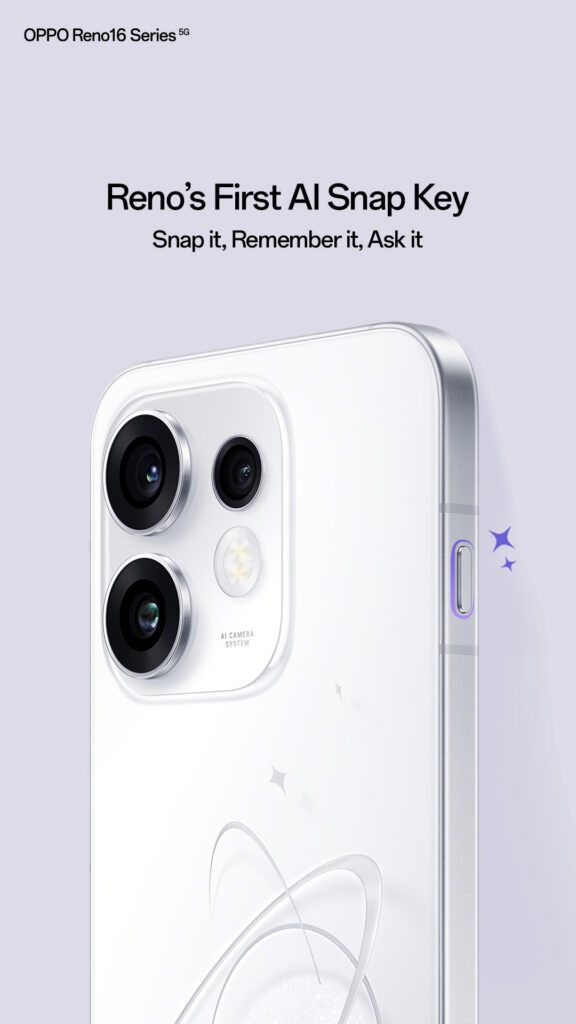
It is a bit smarter than a basic shortcut key too. Point it at a meeting invite or an event mentioned in a chat, and it can read the on-screen text and add the event to your calendar without you leaving the app you are in. And if none of that appeals to you, you can just reassign it to whatever you actually use most, the camera, a flashlight toggle, or any other frequently used tool.
AI Mind Pilot: Gemini, Perplexity and ChatGPT in One Screen
This is arguably the headline feature of the update. AI Mind Pilot brings Gemini, Perplexity, and ChatGPT into a single interface, so you are not hopping between three separate apps every time you want a second opinion on something.
Ask it something, and it can either pick whichever model suits the question best, or show you answers from all three side by side so you can compare and decide for yourself. OPPO’s own example is trip planning: one model pulls flight options, another handles restaurant picks, a third builds out a day by day itinerary, and you get hotel suggestions, visa requirements, and a packing list without switching tabs even once.
The more interesting part, at least on paper, is that Mind Pilot is tied into your saved memory. Over time, it is supposed to use what you have stored in Mind Space to give answers that actually reflect your preferences, rather than treating every question like the first one you have ever asked it.
AI Mind Space and AI Bill Manager: A Second Brain, Sort Of
Anyone who has ever lost a screenshot in the depths of their gallery will get why AI Mind Space exists. It is built to be the single place where all your captured information lands, travel plans, receipts, café menus you liked, random late-night ideas, and it sorts everything into categories automatically so you can actually find it later.
Sitting inside that same space is AI Bill Manager, which takes receipts, screenshots, texts, and even voice notes and turns them into something resembling an actual expense record. It tracks spending categories, handles multiple currencies with live exchange rates, and rolls everything up into monthly summaries, the kind of thing that usually needs a separate budgeting app.
There are four ways to log a bill:
| Method | How It Works |
|---|---|
| Screen Memory | Short press the AI Snap Key to save on-screen bill information |
| Voice Memory | Long press the AI Snap Key to record a spoken bill entry |
| Manual Entry | Add bill details directly within the app |
| SMS Auto-Sync | Bills are logged automatically from bank SMS notifications |
AI Menu Translation and AI Voice Translation for Travellers
If you eat your way through every trip abroad the way most of us claim we will, AI Menu Translation is worth knowing about. Point the camera at a restaurant menu, and it translates it, flags allergens, identifies dishes, and even converts the prices into rupees so you are not doing mental math over dinner.
AI Voice Translation handles the spoken side of things, filtering out background noise so conversations come through clearly even in a noisy street or café. There is also AI Live Translator, built for longer stretches of spoken content, a lecture, a conference talk, a business meeting, that adapts to context as the conversation moves along rather than translating word for word.
AI Recording Sticker and AI Scan for Work and Study
For meetings and lectures, AI Recording Sticker lets you drop markers, insert photos, and jot notes while a recording is running, and once it wraps up, it auto-generates a summary with the key points highlighted. It is a small feature, but a genuinely useful one if you sit through a lot of long calls.
AI Scan and AI Extract cover the document side. Point them at a handout, a form, or a page with a busy layout, and they pull the content out cleanly and turn it into something you can actually edit and search later.
ColorOS 16: Live Space and Capsule Mode
Software features aside, ColorOS 16 itself gets a visual refresh through Live Space. The idea is to surface useful information without constantly interrupting whatever you are doing.
Capsule Mode shows live updates right on the lock screen when something new comes in, tap it, and you jump straight into the relevant app. Swipe between capsules to juggle multiple ongoing things, or pull up from one to see a full list of pending notifications in a clean, organised view. There is an Immersive Mode too, meant for music playback or active timers, so you are not getting pulled away from the task at hand.
OPPO says long-term smoothness optimisations should keep the interface fast even years down the line, though that is the kind of claim that only really gets tested after eighteen months of daily use.
Snapdragon 7 Gen 4: The Chip Behind All This AI
None of the above works without hardware to back it, and that is where the Snapdragon 7 Gen 4 comes in. Built on a 4nm process, OPPO claims meaningful gains across the board.
| Metric | Improvement Claimed by OPPO |
|---|---|
| CPU Performance | Up to 27 percent faster |
| Peak Clock Speed | Up to 2.8GHz |
| GPU Rendering | Up to 30 percent faster |
| AI Engine Performance | Up to 65 percent improvement over predecessor |
That AI performance bump is really the whole point here. Running three chat models, a memory hub, live translation, and on-device processing simultaneously needs headroom, and this is the chip OPPO is betting on to deliver it without the phone getting warm in your hand or the software stuttering under load.
Privacy: Where Your Data Actually Goes
With this much personal information flowing through one device, bills, voice notes, travel plans, privacy questions come up fairly quickly. OPPO’s answer is Private Computing Cloud, which combines on-device processing with end-to-end encryption so sensitive data stays protected through each AI interaction.
There is also OPPO Lock, a theft protection layer with remote locking, an automatic SIM removal lock, and chip-level deep lock tech meant to stop unauthorised access, data transfers, or forced flashing if the phone ends up in the wrong hands.
Where to Buy the OPPO Reno16 Series
India pricing has not been announced yet, and the phone is set to launch on July 2. Once it goes live, it is expected to be available through the OPPO India online store, Amazon.in, Flipkart, and offline retail partners.
Until the official listing goes live, here is where you can track it on Amazon:
Check OPPO Reno16 Series listings on Amazon.in
Frequently Asked Questions
What chipset does the OPPO Reno16 use? The OPPO Reno16 runs on the Snapdragon 7 Gen 4 Mobile Platform, built on a 4nm process.
What is AI Mind Pilot on the OPPO Reno16? AI Mind Pilot combines Gemini, Perplexity, and ChatGPT in one interface, letting users compare answers across models or have the phone pick the most relevant one automatically.
When does the OPPO Reno16 Series launch in India? The OPPO Reno16 Series is set to launch in India on July 2, 2026.
Does the OPPO Reno16 have a dedicated AI button? Yes. The AI Snap Key is a customisable physical button that captures screenshots, records voice notes, and opens AI Mind Space depending on how it is pressed.