
OPPO India has started rolling out the ColorOS 16 June 2026 update, bringing a fresh batch of features built around entertainment, security and everyday convenience. The update introduces a dedicated Sports Widget, shared Audio Sharing across two Bluetooth earphones, new Accessibility Security Alerts, richer weather data and a handful of smaller quality of life improvements across the system.
This is the latest in OPPO’s monthly ColorOS 16 update cycle, following the March and May releases that focused on AI tools and system security. The June build leans more towards real time, everyday usefulness rather than headline AI features.
Here is everything included in the ColorOS 16 June update for OPPO smartphones in India.
Table of contents
- Sports Widget: Live Scores Without Switching Apps
- Audio Sharing Across Two Bluetooth Earphones
- Accessibility Security Alerts: A Smarter Layer of Protection
- Weather App Gets Moonrise, Moonset and Moon Phase Data
- Outdoor Mode: Faster App Access and Smoother Transitions
- Smaller Additions Worth Knowing About
- ColorOS 16 June Update: Quick Summary
- Rollout Timeline
- Which OPPO Phones Lead the ColorOS 16 Experience
- Thoughts
Sports Widget: Live Scores Without Switching Apps
The standout addition this month is the new Sports Widget, designed to keep users updated on football tournaments without needing to open a separate app.
With AI Suggest enabled, match information is automatically pushed to the Home Screen and Shelf around 30 minutes before kickoff on match day. Users who prefer manual control can add the Sports Widget directly to their Home Screen or Shelf for quick access to schedules, scores and live updates.
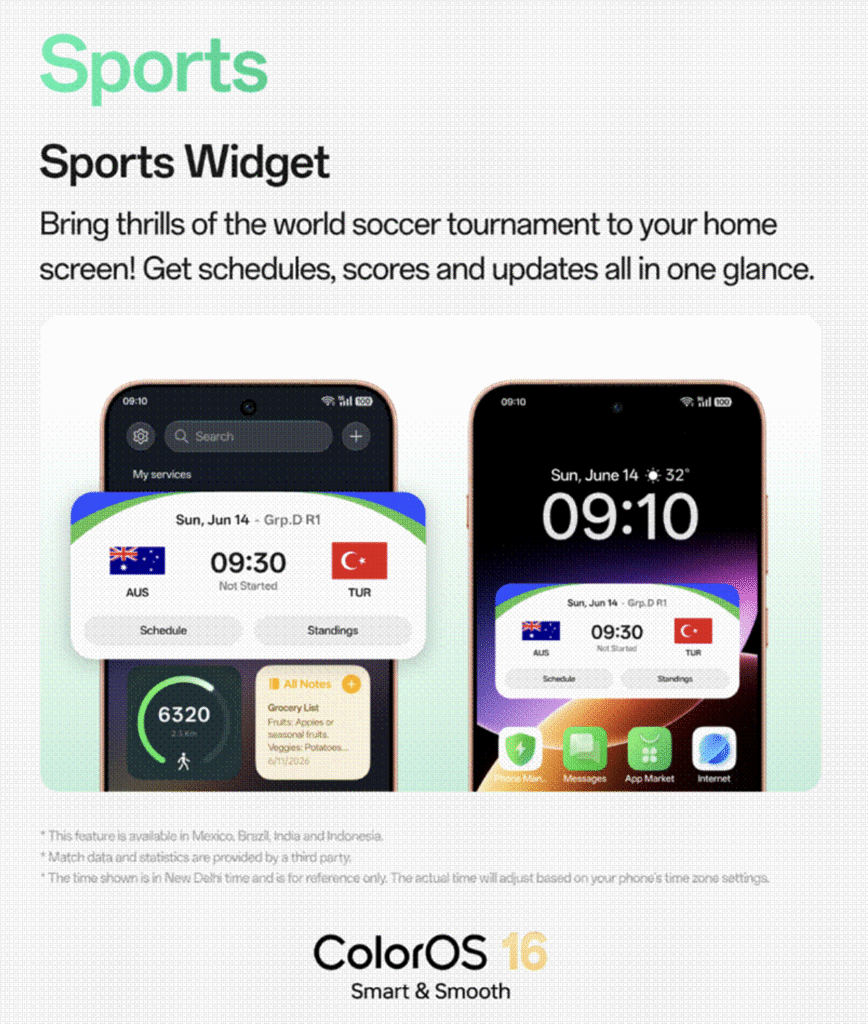
The idea is simple: fewer app switches, fewer interruptions, and live match data sitting right where you already look.
Audio Sharing Across Two Bluetooth Earphones
ColorOS 16 now supports Audio Sharing between two connected Bluetooth earphones at the same time, straight from a single OPPO smartphone.
This is useful for watching a movie together, sharing a playlist, or keeping a travel companion entertained without splitting a single pair of earphones or relying on a wired splitter. Both users get the same audio feed simultaneously from one phone.
Accessibility Security Alerts: A Smarter Layer of Protection
Security gets a meaningful update with Accessibility Security Alerts. If an app installed from outside the Play Store or an unknown source requests Accessibility permissions, often a red flag for malicious apps, users now get a real time notification.
From that alert, permissions can be revoked instantly. The feature runs quietly in the background, so there is no extra setup or ongoing prompts during regular use, just protection when it actually matters.
Weather App Gets Moonrise, Moonset and Moon Phase Data
The native Weather app now shows Moonrise and Moonset timings along with live Moon Phase updates. This is a small but welcome addition for anyone into outdoor photography, stargazing or simply wanting more context than just temperature and rain forecasts.
Outdoor Mode: Faster App Access and Smoother Transitions
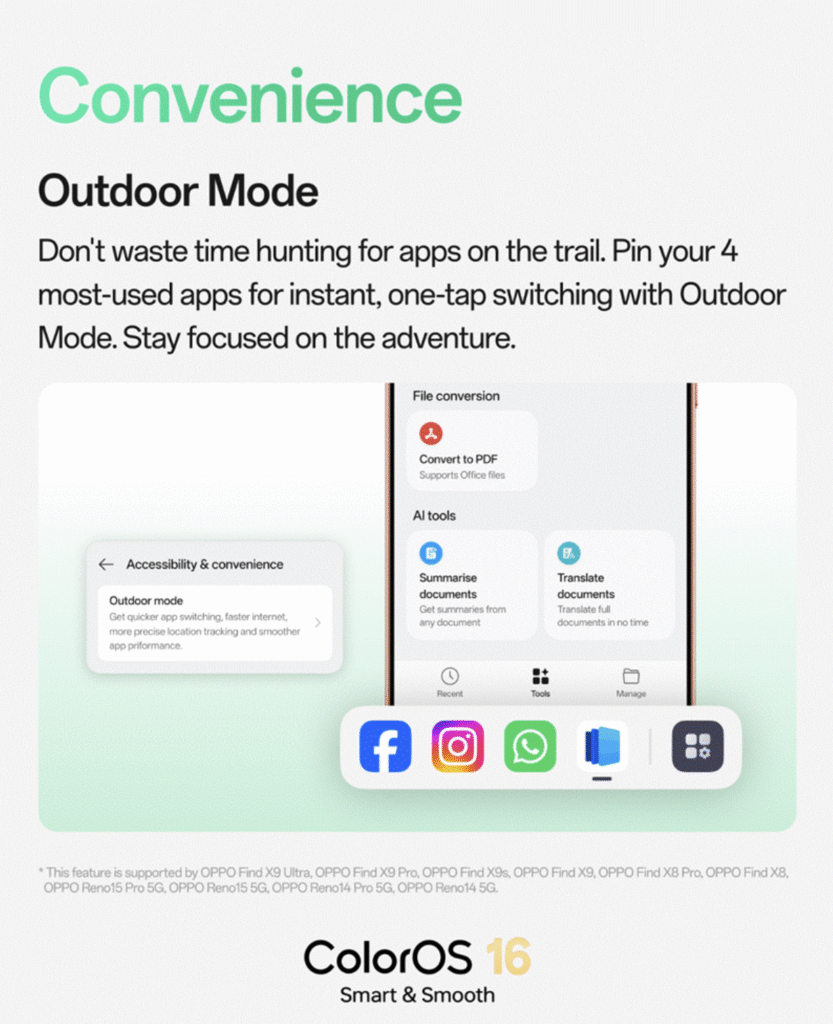
Outdoor Mode has been refined for better usability in bright or fast moving environments. Users can now pin up to four frequently used apps for instant access while Outdoor Mode is active. OPPO has also tuned app transitions and location responsiveness, making the mode feel noticeably smoother than before.
Smaller Additions Worth Knowing About
A few other changes round out the June update:
- 2K screenshots in Game Capture, letting users save higher detail gameplay clips and screenshots
- App Suggestions in the Categories view of the app drawer, which intelligently surfaces frequently used apps for faster navigation
ColorOS 16 June Update: Quick Summary
| Feature | What Changes |
|---|---|
| Sports Widget | Live football scores and schedules on Home Screen or Shelf, auto pushed 30 minutes before match day |
| Audio Sharing | Two Bluetooth earphones connected simultaneously to one phone |
| Accessibility Security Alerts | Real time alert and instant revoke option when unknown apps get Accessibility access |
| Weather App | Moonrise, Moonset and live Moon Phase data added |
| Outdoor Mode | Pin up to 4 apps, smoother transitions, better location response |
| Game Capture | 2K screenshot support |
| App Drawer | App Suggestions added to Categories view |
Rollout Timeline
OPPO has confirmed the ColorOS 16 June update will roll out in phases starting June 1 and concluding by June 30, 2026. As with previous ColorOS updates, the rollout is staggered by device and region, so not every eligible phone will receive the update on the same day.
To check if the update has reached your device, head to Settings > Software Update.
Which OPPO Phones Lead the ColorOS 16 Experience
While ColorOS 16 is rolling out across OPPO’s existing device lineup, the Find X9 series remains the flagship showcase for the platform’s features, including AI tools, security enhancements and the new Sports Widget experience. The Reno14 Pro also ships with the broader ColorOS feature set as OPPO continues extending support down its lineup.
If you are considering a new OPPO phone that already runs the latest ColorOS build, here are the current flagship and upper mid range options.
OPPO Find X9 Ultra, with its Hasselblad tuned camera system and Snapdragon 8 Elite Gen 5 processor, is available on Amazon India.
Buy OPPO Find X9 Ultra on Amazon
OPPO Find X9, the standard model in the series with a 7025mAh battery and triple 50MP camera setup, is also listed on Amazon.
OPPO Find X9s, which uses the Dimensity 9500s chipset alongside the same Hasselblad camera tuning, is available as well.
For buyers looking at a lighter, more compact flagship, the OPPO Reno14 Pro offers a triple 50MP camera system with a 3.5x telephoto lens and a 6200mAh battery.
Thoughts
The ColorOS 16 June update is not a flashy release, but it solves real, everyday problems. A live Sports Widget for match season, shared audio for two people on one phone, and a security alert system that flags risky permission grants in real time are the kind of features that quietly improve daily use rather than just looking good on a spec sheet.
Combined with the March update’s security focus and May’s AI driven tools, ColorOS 16 is shaping up to be one of OPPO’s most consistently improved software platforms in recent years.