
You have probably seen this happen in offices two or three people sitting around a laptop trying to join an important video call because every meeting room is already occupied. BenQ wants to solve exactly this kind of problem with its latest workplace products showcased at InfoComm India 2026.
The company introduced the new BenQ Board CP5505, along with a massive 135-inch dvLED display, the iScreenBar, and updates to its ScreenBar desk lighting range.
The products are designed for different types of workspaces, ranging from an executive cabin and large presentation room to a regular office desk.
Table of contents
What Is the BenQ Board CP5505?
The BenQ Board CP5505 is a 55-inch interactive display mainly designed for executive cabins and smaller meeting spaces.
Think of it as a large touchscreen that combines a display, video conferencing system, digital whiteboard and computer-like features in one device.
Instead of booking a conference room every time a hybrid meeting is needed, executives can use the CP5505 directly from their cabin.
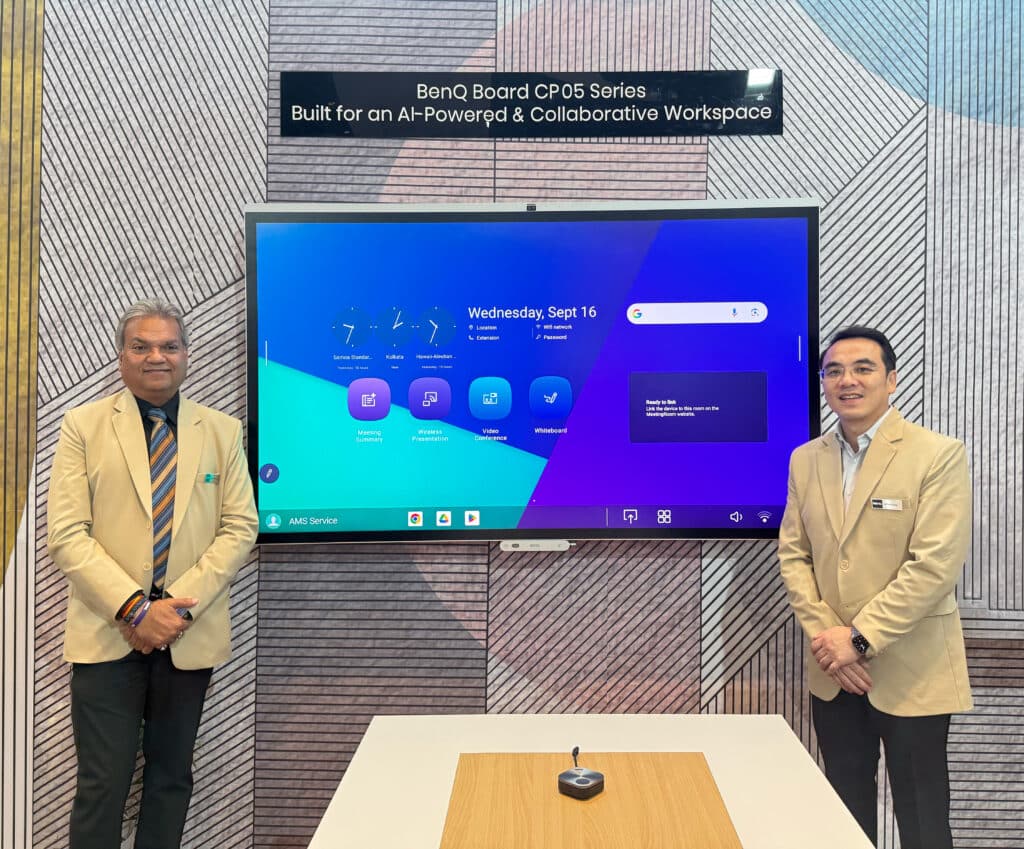
It supports video conferencing, wireless screen sharing and file access, making it easier to run meetings with both people in the room and participants joining remotely.
AI Features Make Meetings More Convenient
One useful feature on the CP5505 is speaker tracking. The system can detect who is speaking in the room and adjust the meeting experience accordingly, making conversations with remote participants feel more natural.
Users can also quickly access their own files and applications when they start using the display.
Another useful addition is the built-in AI transcript and meeting summary feature. It can record a meeting, convert the discussion into text and create a written summary after the meeting ends.

This can be especially useful when teams want to keep track of important discussions, tasks and decisions without manually writing everything down.
The board also supports Google Assistant, which can be activated directly from the display. Users can even trigger the meeting summary feature while a meeting is still in progress.
BenQ has also focused on colour accuracy. The display is tuned to meet Pantone colour accuracy standards, which are commonly used by designers and other professionals who need colours to appear correctly on screen.
Combined with strong contrast for text-heavy documents, BenQ says the CP5505 can also be useful for legal, design and clinical teams where visual accuracy matters.
| BenQ Board CP5505 Highlights | Details |
|---|---|
| Screen size | 55-inch interactive display |
| Designed for | CXO cabins and small meeting spaces |
| Key AI feature | Meeting transcript and AI summary |
| Voice assistant | Google Assistant |
| Colour standard | Pantone accuracy |
| Suitable for | Legal, design and clinical teams |
Rajeev Singh, Managing Director of BenQ India and South Asia, explained that many offices regularly face situations where people crowd around a laptop for an important call simply because all meeting rooms are occupied.
BenQ sees this as more of a workspace and real estate problem than just a technology problem. The CP5505 tries to solve it by bringing a proper hybrid meeting setup directly into an executive cabin.
BenQ Also Showcases a Massive 135-Inch dvLED Display
Smaller meeting rooms are only one part of the workplace.
For larger presentations, company town halls and leadership sessions, BenQ also showcased a 135-inch dvLED display.
dvLED stands for Direct View LED. Instead of using one large LCD or OLED panel, these displays are made using smaller LED modules joined together. This allows manufacturers to build extremely large screens.
BenQ’s 135-inch model supports 100% DCI-P3 colour coverage.
DCI-P3 is a wide colour standard originally developed for digital cinema. It allows the display to show a wider range of colours, helping images and videos look richer and more accurate.
The new screen expands BenQ’s enterprise display range beyond meeting rooms and into auditoriums, large conference areas and presentation spaces where people need to clearly see content from a distance.
iScreenBar and ScreenBar Max Are Designed for Work Desks
BenQ also previewed two additions to its desk lighting lineup in India — the iScreenBar and ScreenBar Max.
A monitor light bar sits on top of a computer monitor and directs light towards the desk. The idea is to illuminate the workspace without shining light directly into the user’s eyes or creating distracting reflections on the screen.
The iScreenBar has been designed specifically for Apple iMac users.
It uses BenQ’s ASYM-Light anti-glare optical design, already seen on other ScreenBar models, while its body is designed to fit neatly with the thin profile of an iMac.
The ScreenBar Max, meanwhile, is aimed at people using dual-monitor or multi-monitor setups.
It uses what BenQ calls ASYM-TriZone Light, which creates a wider triangular lighting pattern. This helps spread light more evenly across horizontal, vertical and curved multi-monitor setups while reducing dark areas between displays.
| BenQ Desk Light | Best Suited For |
|---|---|
| BenQ ScreenBar | Single-monitor setups and users looking for a more affordable option |
| BenQ ScreenBar Plus | Single-monitor setup with a wireless control dial |
| BenQ ScreenBar Max | Dual-monitor and multi-screen workspaces |
| BenQ iScreenBar | Apple iMac users |
The existing BenQ ScreenBar and BenQ ScreenBar Plus are already available in India and can be checked on Amazon.
The new ScreenBar Max and iScreenBar were previewed at InfoComm India 2026, but BenQ has not yet announced their India pricing or wider retail availability.
Those interested can keep an eye on the ScreenBar Max listing on Amazon as availabilit