
Your mouse is the one gadget you touch more than your phone during a workday. Thousands of clicks, endless scrolling through spreadsheets, constant hopping between tabs. So when the Logitech MX Master 3S falls to ₹5,795, it deserves a proper look.
That price applies to the MX Master 3S Bluetooth Edition in Graphite, listed with an MRP of ₹12,937. That works out to roughly 55% off, and a coupon on the listing can bring the final bill down to about ₹5,215.
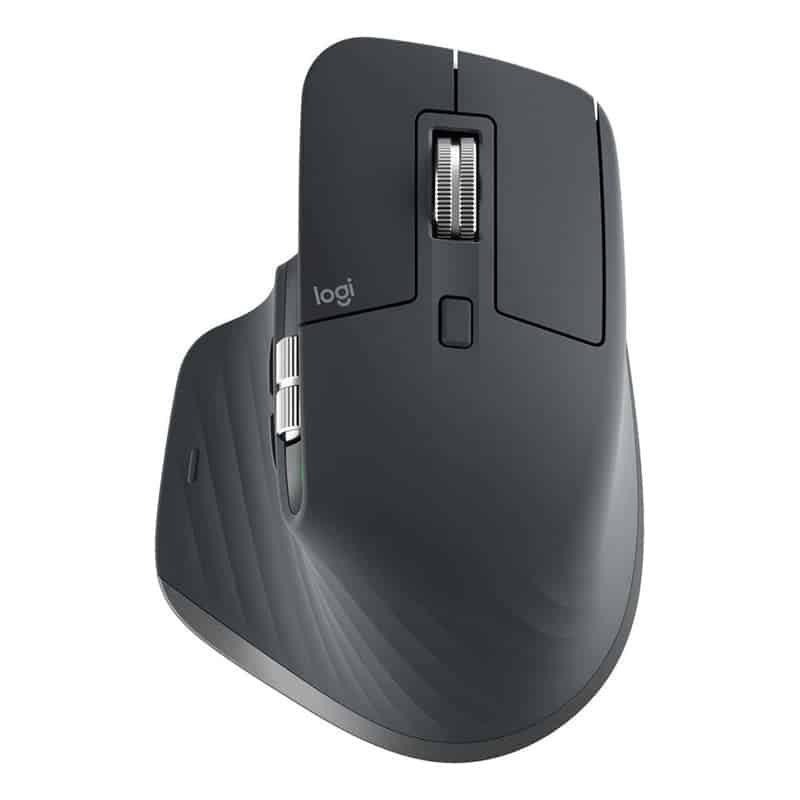
| Detail | What You Get |
|---|---|
| Model | Logitech MX Master 3S Bluetooth Edition (Graphite) |
| Deal price | ₹5,795 |
| MRP | ₹12,937 |
| Price with coupon | About ₹5,215 |
| Customer rating | 4.7 out of 5 |
| Grab it here | See today’s deal price |
Table of contents
- What Is the MX Master 3S Bluetooth Edition?
- Logitech MX Master 3S Specs at a Glance
- Why the MX Master 3S Is Called the Best Productivity Mouse
- Thumb Wheel, Gesture Button and Logi Options+
- Logitech MX Master 3S for Mac and Windows Users
- Battery Life and Charging
- MX Master 3S vs MX Master 4 vs MX Master 2S
- Logitech MX Master 3S Alternatives at Different Budgets
- Build a Complete Productivity Desk Setup
- Who Will Get the Most Out of This Mouse
- How to Connect the MX Master 3S Bluetooth Edition
- Frequently Asked Questions
- The Bottom Line on This Deal
What Is the MX Master 3S Bluetooth Edition?
Logitech sells the MX Master 3S in a few versions. The regular box includes a tiny USB dongle called a Logi Bolt receiver. The Bluetooth Edition skips that dongle and connects only over Bluetooth.
For most laptop owners, this changes nothing. MacBooks, Windows laptops and Chromebooks all have Bluetooth built in. You pair the mouse once and it reconnects every time you open the lid.
Desktop PC users need to check one thing first. Many older desktops lack Bluetooth. A small USB Bluetooth adapter fixes that for a few hundred rupees.
Logitech MX Master 3S Specs at a Glance
| Feature | Logitech MX Master 3S Bluetooth Edition |
|---|---|
| Sensor | 8,000 DPI Darkfield, tracks on glass |
| Scroll wheel | MagSpeed electromagnetic, up to 1,000 lines per second |
| Clicks | Quiet clicks |
| Buttons | 7, customisable |
| Connectivity | Bluetooth, up to 3 devices |
| Charging | USB-C |
| Battery | Up to 70 days on a full charge |
| Quick charge | 1 minute gives about 3 hours of use |
| Works with | Windows, macOS, Linux, ChromeOS, iPadOS |
| Price today | ₹5,795, check live price |
Why the MX Master 3S Is Called the Best Productivity Mouse
The first thing you notice is the scroll wheel. Logitech calls it MagSpeed. It uses magnets instead of a regular notched wheel, so a gentle flick sends a 1,000 row spreadsheet flying to the bottom in about a second.
Slow it down and it clicks line by line again, so precise editing stays easy. Video editors, coders and anyone living inside Excel tend to fall in love with this wheel within a day.
The second highlight is the 8K DPI sensor. DPI (dots per inch) tells you how far the cursor moves when you move the mouse. Higher DPI means less hand movement on large or dual monitors.
Logitech’s Darkfield tech also lets it track on glass desks, as long as the glass is at least 4 mm thick. Hotel tables, cafe counters and glossy work desks stop being a problem.
Quiet clicks round things off. The buttons make far less noise than a regular mouse, which helps in shared offices, late night work sessions and video calls where every click gets picked up by the mic.
Thumb Wheel, Gesture Button and Logi Options+
On the left side sits a thumb wheel for horizontal scrolling. It is perfect for wide spreadsheets, video timelines and design canvases. Below it is a gesture button that you press and drag to switch desktops or show all open windows.
All of this is controlled through the Logitech MX Master 3S software called Logi Options+. It is a free app for Windows and Mac where you can remap every button.
You can even set different shortcuts for different apps. The thumb wheel can zoom in Photoshop, change tabs in Chrome and scrub the timeline in Premiere Pro, all automatically.
Logitech MX Master 3S for Mac and Windows Users
Searching for the Logitech MX Master 3S for Mac? This Bluetooth Edition works smoothly with MacBook Air and MacBook Pro models, and Logi Options+ is available on macOS too.
Its Easy-Switch button lets you pair up to three devices, say a work laptop, a personal MacBook and an iPad. One press on the button underneath and you jump between them.
A feature called Logitech Flow goes further. With two computers on the same network, you can move the cursor off one screen and onto the other, and even copy a file from one machine and paste it on the second.
Battery Life and Charging
Battery anxiety is not really a thing here. A full charge lasts up to 70 days, depending on usage. It charges through USB-C, the same cable as most modern phones and laptops.
Forgot to charge before a meeting? Plug it in for a single minute and you get around three hours of use. You can also keep working while it charges.
MX Master 3S vs MX Master 4 vs MX Master 2S
Logitech MX Master 3S vs 4 is one of the most searched comparisons right now. The MX Master 4 adds haptic feedback (small vibrations you feel under your thumb) and a new shortcut system, but it costs almost double today.
The older MX Master 2S is only ₹300 cheaper, yet it misses the quiet clicks, the 8K sensor and USB-C charging. At these prices, the 3S sits in the sweet spot.
| Model | Price Today | Key Difference | Buy Link |
|---|---|---|---|
| Logitech MX Master 3S Bluetooth Edition | ₹5,795 | 8K DPI, quiet clicks, USB-C | Grab the 3S deal |
| Logitech MX Master 4 | ₹10,495 | Haptic feedback, newer design | View MX Master 4 |
| Logitech MX Master 2S | ₹5,495 | Older model, louder clicks | Check 2S price |
Logitech MX Master 3S Alternatives at Different Budgets
Not everyone wants a large, palm filling mouse. If your hands are small or you travel a lot, the compact MX Anywhere 3S keeps the same 8K sensor and MagSpeed wheel in a pocket friendly body.
On a tighter budget, the Logitech Signature M650 L gives you silent clicks and a comfortable shape for a fraction of the price, though it lacks the premium scroll wheel and thumb wheel.
| Alternative | Approx Price | Best For | Buy Link |
|---|---|---|---|
| Logitech MX Anywhere 3S | Around ₹8,999 | Travel and small hands | See MX Anywhere 3S |
| Logitech Signature M650 L | ₹2,370 | Budget office use | Shop the M650 L |
Build a Complete Productivity Desk Setup
The MX Master 3S pairs naturally with Logitech’s MX keyboards. The MX Keys Mini is a compact backlit keyboard that switches between the same three devices.
There is also a ready made MX Master 3S Bluetooth Edition and MX Keys Mini combo listed at ₹15,290. If you plan to buy both, compare it against buying each separately during the sale.
Pairing a good mouse with a sharp screen makes the biggest difference. Our look at the BenQ RD280UG coding monitor explains why developers are moving to taller displays.
Mac users can also check out the BenQ MA270S 5K monitor built for Mac, which matches nicely with this mouse on a clean desk.
| Accessory | Price | Why Add It | Buy Link |
|---|---|---|---|
| GadgetBite Hard Case for MX Master 3S | ₹389 | Protects the mouse in a laptop bag | Pick up the case |
| M.G.R.J Carrying Case with Lanyard | ₹474 | Cushioned travel pouch | View this pouch |
| Logitech MX Keys Mini | ₹9,495 | Matching wireless keyboard | See keyboard price |
| Desk Mats and Mouse Pads | Varies | Smoother glide, cleaner desk | Browse desk mats |
Who Will Get the Most Out of This Mouse
Office workers who live in Excel, PowerPoint and email will notice the speed of the scroll wheel within the first hour. Developers get faster code navigation and app specific shortcuts.
Video editors and designers benefit most from the thumb wheel, since horizontal timelines and wide canvases stop being a drag. Students juggling a laptop and a tablet will like the three device switching.
Gamers are better served elsewhere. This is a work tool, so if gaming is your focus, our list of gaming gadget picks including the Logitech G502 Hero is a better starting point.
How to Connect the MX Master 3S Bluetooth Edition
Setup takes under a minute:
- Switch the mouse on using the button underneath.
- Press and hold the Easy-Switch button until the light blinks fast.
- Open Bluetooth settings on your laptop and pick “MX Master 3S”.
- Install Logi Options+ to customise buttons and gestures.
Repeat the same steps on channel 2 and channel 3 to add a second and third device.
Frequently Asked Questions
What is the Logitech MX Master 3S price in India right now? The MX Master 3S Bluetooth Edition is selling for ₹5,795 against an MRP of ₹12,937. A coupon can bring it close to ₹5,215. Check the latest price here.
Does the Bluetooth Edition come with a USB dongle? No. The box has the mouse and a USB-C charging cable. It connects through your computer’s built in Bluetooth.
Is the MX Master 3S good for MacBook users? Yes. It works with macOS, supports Logi Options+ on Mac and tracks well even on glossy surfaces.
What is the Logitech MX Master 3S warranty period? Warranty terms are shown on the product listing. Keep your invoice safe, since Logitech service centres ask for it during claims.
Can I use it on a glass table? Yes, the Darkfield sensor tracks on glass that is at least 4 mm thick.
The Bottom Line on This Deal
At ₹5,795, the Logitech MX Master 3S costs less than what many people pay for mid range wireless mice, while bringing the scroll wheel, sensor and comfort that made it a favourite on office desks worldwide.
Sale prices on Amazon move fast during festival weeks, so the coupon and deal price may not last. If a calmer, faster workday sounds good, lock in the MX Master 3S at ₹5,795 before it bounces back.